Home
About Us
Locations
Contact Us
Products
Price List
Promos
SaleSign In Cart
Facebook Viber Instagram
Facebook Viber Instagram


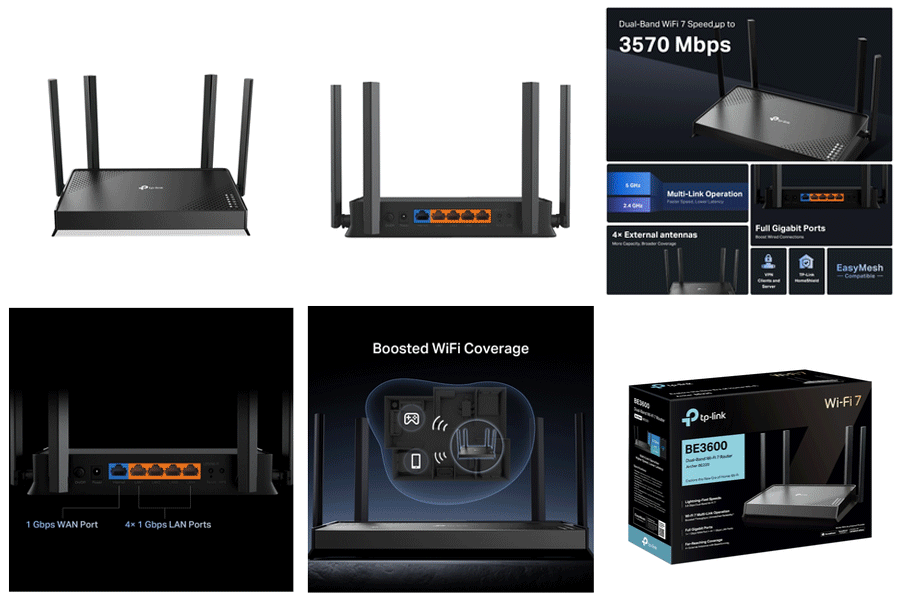

| WiFi Speeds | BE3600 ? 5 GHz: 2882 Mbps (802.11be) ? 2.4 GHz: 688 Mbps (802.11be) |
|---|---|
| WiFi Range | 3 Bedroom Houses 4× External Antennas Multiple antennas form a signal-boosting array to cover more directions and large areas Beamforming Concentrates wireless signal strength towards clients to expand WiFi range |
| WiFi Capacity | High Dual-Band Allocate devices to different bands for optimal performance 2×2 MU-MIMO Simultaneously communicates with multiple MU-MIMO clients OFDMA Simultaneously communicates with multiple clients Airtime Fairness Improves network efficiency by limiting excessive occupation DFS Access an extra band to reduce congestion 4 Streams Connect your devices to more bandwidth |
| Advanced Features | ? Multi-Link Operation (MLO) ? 4K-QAM ? Multi-RUs ? EasyMesh-Compatible ? Works with Alexa and Google Assistant ? IoT Network |
| Wireless Mode | ? Router Mode ? Access Point Mode |
| Network Security | ? SPI Firewall ? Access Control ? IP & MAC Binding ? Application Layer Gateway ? HomeShield Security Real-Time IoT Protection Malicious Site Blocker Intrusion Prevention System DDoS Attack Prevention Home Network Scanner |
|---|---|
| Guest Network | ? 1× 5 GHz Guest Network ? 1× 2.4 GHz Guest Network |
| VPN Server | ? OpenVPN Server ? PPTP VPN Server ? L2TP VPN Server ? WireGuard VPN Server |
| VPN Client | ? Open VPN Client ? PPTP VPN Client ? L2TP VPN Client ? WireGuard VPN Client |
| WiFi Encryption | ? WPA ? WPA2 ? WPA3 ? WPA/WPA2-Enterprise (802.1x) |
| Ethernet Ports | ? 1× 1 Gbps WAN ? 4× 1 Gbps LAN |
|---|---|
| Power | 12 V ? 2 A (US) 12 V ? 1.5 A (EU) |
| Buttons | ? Power On/Off Button ? LED/Wi-Fi Button ? WPS Button ? Reset Button |
| Protocol | ? IPv4 ? IPv6 |
|---|---|
| Service Kit | HomeShield Learn More> |
| EasyMesh | Compatible with EasyMesh |
| Parental Controls | HomeShield Parental Controls Custom Profiles Professional Content Filter Library Family Time Bedtime Off Time Time Rewards Family Online Time Ranking Pause the Internet Weekly and Monthly Reports |
| WAN Type | ? Dynamic IP ? Static IP ? PPPoE ? PPTP ? L2TP |
| Quality of Service | QoS by Device |
| Cloud Service | ? Auto Firmware Upgrade ? TP-Link ID ? DDNS |
| NAT Forwarding | ? Port Forwarding ? Port Triggering ? DMZ ? UPnP |
| IPTV | ? IGMP Proxy ? IGMP Snooping ? Bridge ? Tag VLAN |
| DHCP | ? Address Reservation ? DHCP Client List ? Server |
| DDNS | ? TP-Link ? NO-IP ? DynDNS |
| Management Features | ? Tether App ? Webpage |
| Network Services Enabled by Default | Web Server Manage and configure device through web (HTTP/HTTPS) ? Port: 80/443 ? Protocol: TCP DNS DNS ? Port: 53 ? Protocol: TCP & UDP DHCP Server IP address assignment (DHCP) ? Port: 67 ? Protocol: UDP App management Manage and configure device through app ? Port: 20001 ? Protocol: TCP ? Port: 30001 ? Protocol: TCP ? Port: 20002 ? Protocol: UDP |
|---|---|
| System Requirements | Internet Explorer 11+, Firefox 12.0+, Chrome 20.0+, Safari 4.0+, or other JavaScript-enabled browser Cable or DSL Modem (if needed) Subscription with an internet service provider (for internet access) |
| Certifications | CE, FCC |
| Environment | ? Operating Temperature: 0?~40? (32? ~104?) ? Operating Humidity: 10%~90% non-condensing |

Located in the Philippines!
advertisements