Home
About Us
Locations
Contact Us
Products
Price List
Promos
SaleSign In Cart
Facebook Viber Instagram
Facebook Viber Instagram





Model
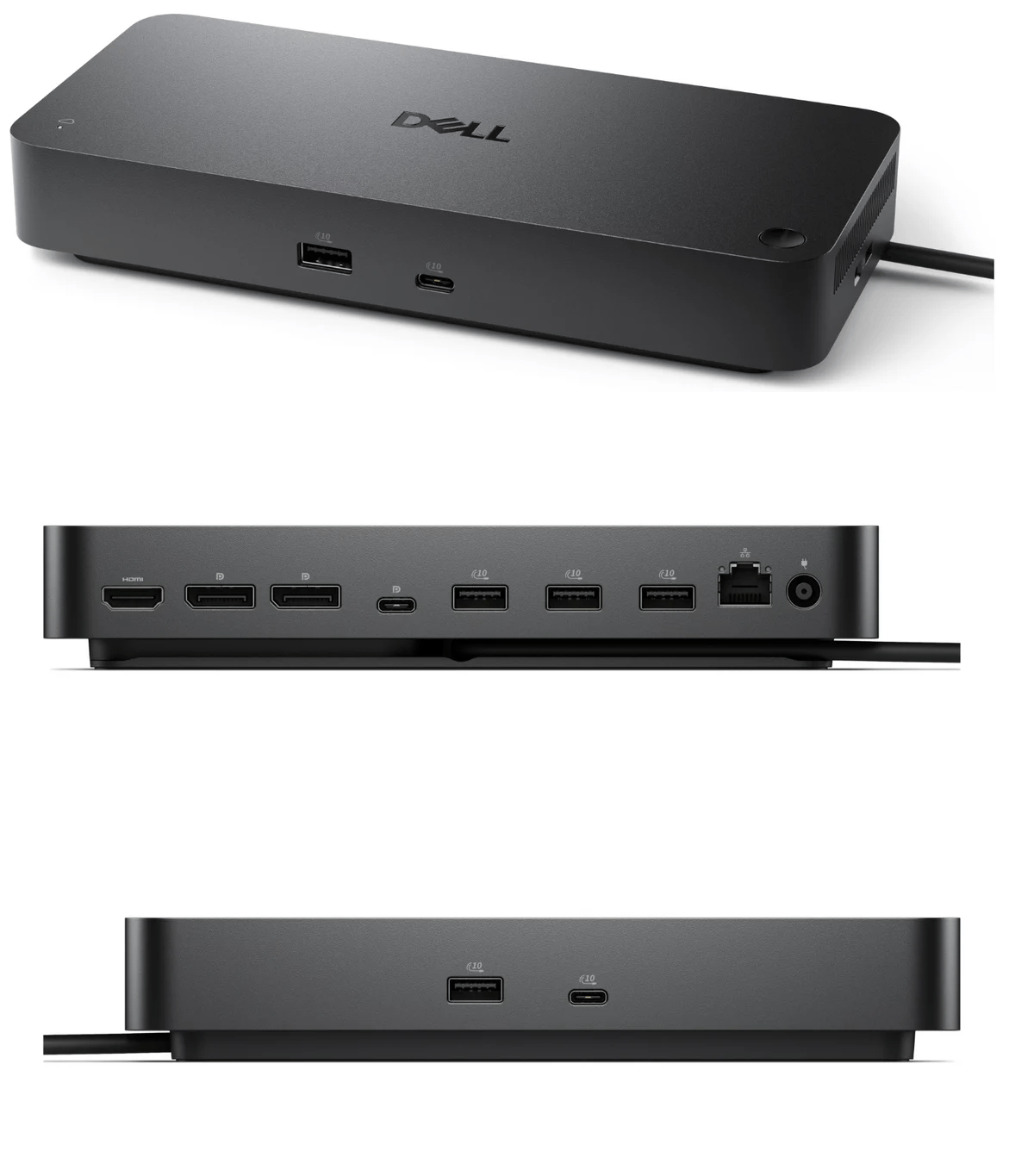
Dell Pro Smart Dock SD25Docking Interface
USB Type-C with DP Alt Mode ConnectorPower
Power Adapter 180 Watt AC with up to 130 Watt power delivery to Dell Commercial Notebooks
Up to 96 Watts power delivery to non-Dell systems
Display Support
DP1.4 without Display Stream Compression
Up to:
4 x SXGA (1280x1024) @60Hz
3 x FHD (1920x1080) @60Hz
2 x QHD (2560x1440) @60Hz
1 x 4K (3840 x 2160) @60Hz
DP1.4 / DP2.1 with Display Stream Compression
Up to:
4 x WQHD (3440 x 1440) @60Hz
3 x WQHD (3440 x 1440) @60Hz
2 x 5K (5120 x 2160) @60Hz
1 x 6K (6144 x 3456) @60Hz
Video Interfaces
2 x DP1.4
1 x HDMI 2.1
1 x USB-C 3.2 Gen 2 Multi-function DisplayPort 1.4
USB Ports (DATA ONLY)
4 x USB-A 3.2 Gen 2 (10 Gbps)
1 x USB-C 3.2 Gen 2 (10 Gbps)
USB Ports (POWER)
4 x USB-A 3.2 Gen 2 (4.5W each)
1 x USB-C 3.2 Gen 2 (15W)
1 x USB-C Multi-function DisplayPort (7.5W)
All deliver power with or without PC
Host PC Management
MAC address pass-through
PXE Boot
Dock Power Button Sync
Wake-On-LAN
WLAN to LAN switch
Kernel Direct Memory Access (DMA) protection
Dell Firmware Utility
Dell Display and Peripheral Manager
Dell Command Update
Dock Management Features
Remote firmware updates without a PC
Host PC based firmware updates
Firmware update on disconnect
Port disablement independent of PC
Cloud Management (No PC Required)
Dell Device Management Console enables:
? Automatic or scheduled firmware updates
? Maintain specific firmware version or downgrade
? Peripheral inventory and status
Cloud Management Enrollment
Zero Touch provisioning with DHCP Auto Discovery or DNS SRV
Dell Display and Peripheral Manager
Dell Management Agent
Networking
2.5 Gigabit Ethernet
LED Indicators
Remote Management LED
Power Button LED
RJ45 LEDs
Security Slot Type (Cable Lock Sold Seperately)
1 x Kensington lock slot
1 x Wedge-shaped lock slot
Dimensions
205mm x 90mm x 35.25mm
8.07in x 3.54in x 1.39in
Dock Weight (Without Power Adapter)
562 g
1.24 lb
Cable Length
0.9 m
Operating Systems
Windows 10
Windows 11
Ubuntu 24.04
Red Hat Enterprise Linux 9.6 +
ChromeOS 137
What's In The Box
Docking station
Power adapter and power cord
Documentation (Quick Start Guide, Safety, Environmental, and Regulatory Information)

Located in the Philippines!
advertisements