Home
About Us
Locations
Contact Us
Products
Price List
Promos
SaleSign In Cart
Facebook Viber Instagram
Facebook Viber Instagram





An intuitive operation panel that employs an alternating keypad interface on a single touch panel, such that it only displays the keys to the specific function enhancing the user's efficiency.
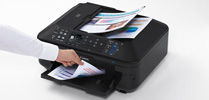
Load up to 35 sheets of regular A4 paper for scanning and copying.

Print photos from your online album or get useful stationery templates directly from your printer.
| Printer | ||
| Maximum Printing Resolution | 9600 (horizontal)*1 x 2400 (vertical)dpi | |
| Print Head / Ink | Ink System: | Individual Ink Cartridge |
| Total Number of Nozzles: | 4,608 | |
| Min. Ink Droplet Size: | 1pl | |
| Ink Tank: | PGI-725 Black, CLI-726 Cyan / Magenta / Yellow / Black | |
| Print Speed Based on ISO / IEC 24734. Click here for summary report Click here for Document Print and Copy Speed Measurement Conditions |
Document: Colour*2: ESAT / Simplex: |
Approx. 9.3ipm |
| Document: B/W*2: ESAT / Simplex: |
Approx. 12.5ipm | |
| Photo (4 x 6")*2: PP-201 / Borderless: |
Approx. 20secs. | |
| Printable Width | Up to 203.2mm (8-inch) | |
| Borderless: | Up to 216mm (8.5-inch) | |
| Printable Area | Borderless Printing*3: | Top / Bottom / Right / Left margin: Each 0mm (Supported Paper Size: A4, LTR, 4 x 6", 5 x 7", 8 x 10") |
| Bordered Printing: | Top margin: 3mm, Bottom margin: 5mm, Left / Right margin: Each 3.4mm (LTR, LGL: Left: 6.4mm, Right: 6.3mm) |
|
| Bordered Auto Duplex Printing: | Top margin: 5mm, Bottom margin: 5mm, Left / Right margin: Each 3.4mm (LTR, LGL: Left: 6.4mm, Right: 6.3mm) |
|
| Paper Size*4 | A4, A5, B5, LTR, LGL, 4 x 6", 5 x 7", 8 x 10", Envelopes (DL, COM10) | |
| Paper Handling (Rear Tray) (Maximum Number) |
Plain Paper | A4, A5, B5, LTR, LGL = 150 |
| High Resolution Paper (HR-101N) |
A4 = 80 | |
| Photo Paper Pro Platinum (PT-101) |
4 x 6" = 20, A4 = 10 | |
| Photo Paper Plus Glossy II (PP-201) |
4 x 6" = 20, A4 = 10 | |
| Photo Paper Plus Semi-Gloss (SG-201) |
4 x 6" = 20, A4, 8 x 10" = 10 | |
| Glossy Photo Paper "Everyday Use" (GP-501) |
4 x 6" = 20, A4 = 10 | |
| Matte Photo Paper (MP-101) |
4 x 6" = 20, A4 = 10 | |
| Photo Stickers (PS-101) |
1 | |
| T-Shirt Transfer (TR-301) | 1 | |
| Envelope | European DL, US Com. #10 = 10 | |
| Paper Handling (Cassette) (Maximum Number) |
Plain paper: | A4, A5, B5, LTR = 150 |
| Support Media for Auto Duplex Printing | Type: | Plain Paper (Bordered) |
| Size: | A4, A5, B5, LTR | |
| Paper Weight | Rear Tray: | Plain Paper: 64 - 105g/m2, Canon specialty paper: Max. paper weight: Approx. 300g/m2 (Photo Paper Pro Platinum PT-101) |
| Cassette: | Plain Paper: 64 - 105g/m2 | |
| Scan | ||
| Scanner Type | Flatbed Platen & Duplex Auto Document Feeder (ADF) | |
| Scanning Method | CIS (Contact Image Sensor) | |
| Optical Resolution*5 | 2400 x 4800dpi | |
| Scanning Bit Depth (Input / Output) | Grayscale: | 16 / 8 bits |
| Colour: | 48 / 24 bits (RGB each 16 / 8 bits) | |
| Line Scanning Speed*6 | Grayscale: | 1.4ms/line (300dpi) |
| Colour: | 4.2ms/line (300dpi) | |
| Scanning Speed*7 | Reflective: A4 Colour / 300dpi: | Approx. 18secs. |
| Maximum Document Size | Flatbed: | A4, LTR (216 x 297mm) |
| ADF: | A4, LTR, LGL | |
| Copy | ||
| Maximum Document Size | A4, LTR (216 × 297mm) (ADF: A4, LTR, LGL) |
|
| Compatible Media | Size: | A4, A5, B5, LTR, LGL, 4 x 6", 5 x 7" |
| Type: | Plain Paper Photo Paper Pro Platinum (PT-101) Photo Paper Plus Glossy II (PP-201) Photo Paper Plus Semi-gloss (SG-201) Glossy Photo Paper "Everyday Use" (GP-501) Matte Photo Paper (MP-101) |
|
| Image Quality | 3 positions (Fast, Standard, High) | |
| Density Adjustment | 9 positions, Auto intensity (AE copy)* * Not supported for ADF |
|
| Copy Speed*8 Based on ISO / IEC 24735 and ISO / IEC 29183 standards. Click here for summary report Click here for Document Print and Copy Speed Measurement Conditions |
Document: Colour: sFCOT / Simplex: | Approx. 14secs. |
| Document: Colour: sESAT / Simplex: | Approx. 7.4ipm | |
| Document (ADF): Colour: ESAT / Simplex: |
Approx. 7.0ipm | |
| Multiple Copy | Black / Colour: | Max. 99 pages |
| Fax | ||
| Type | Desktop Transceiver (Super G3 / Colour Communication) | |
| Applicable Line | PSTN (Public Switched Telephone Network) | |
| Transmission Speed*9 | Black: | Approx. 3secs. (33.6kbps) |
| Fax Resolution | Black: | 8pels/mm x 3.85 lines/mm (Standard), 8pels/mm x 7.7 lines/mm (Fine), 300 x 300dpi (Extra Fine) |
| Print Size | A4, LTR, LGL | |
| Scanning Width | 208mm (A4), 214mm (LTR) | |
| Modem Speed | Max. 33.6kbps (Automatic fall back) | |
| Compression | Black: | MH, MR, MMR |
| Gradation | Black: | 256 levels |
| ECM (Error Correction Mode) | ITU-T T.30 compatible | |
| Address Book | Coded Speed Dialing: | Max. 100 locations |
| Group Dialing: | Max. 99 locations | |
| Transmission / Reception Memory*10 | Approx. 250 pages | |
| PC Fax | ||
| Type | Windows: | via FAX driver |
| Mac: | Not Applicable | |
| Destination Number | 1 location | |
| Network | ||
| Protocol | TCP/IP | |
| Wired LAN | Network Type: | IEEE802.3u (100BASE-TX) / IEEE802.3 (10BASE-T) |
| Data Rate: | 100M / 10Mbps (auto switchable) | |
| Wireless LAN | Network Type: | IEEE802.11n / IEEE802.11g / IEEE802.11b (infrastructure mode) |
| Frequency Band: | 2.4GHz | |
| Data Rate (standard value)*11: | IEEE802.11n: 150Mbps IEEE802.11g: 54Mbps IEEE802.11b: 11Mbps |
|
| Range: | Indoor 50m (depends on the transmission speed and conditions) | |
| Security: | WEP64 / 128 bits, WPA-PSK (TKIP / AES), WPA2-PSK (TKIP / AES) | |
| System Requirements (Please visit www.canon-asia.com to check OS compatibility and to download the latest driver updates) |
Windows | Windows XP SP2, XP SP3 / Windows Vista SP1, Vista SP2 / Windows 7, 7 SP1 |
| Macintosh | Mac OS X v10.4.11 - 10.7 | |
| General Specifications | ||
| Quick Start | Approx. 3secs. | |
| Operation Panel | Display: | LCD (3.0-inch / 7.5cm TFT colour) |
| Auto Document Feeder (ADF) | Paper Handling (Plain Paper): | A4, LTR = 35, LGL = 30 |
| Auto Duplex: | Available | |
| Interface | Wireless LAN b/g/n, Ethernet 10/100, USB 2.0 Hi-Speed, PictBridge, Memory Card Slots, Bluetooth v.20 (optional: BU-30) | |
| Self-Opening Paper Output Tray | Available | |
| Operating Environment | Temperature: | 5 - 35°C |
| Humidity: | 10 - 90% RH (no dew condensation) | |
| Storage Environment | Temperature: | 0 - 40°C |
| Humidity: | 5 - 95% RH (no dew condensation) | |
| Acoustic Noise (PC Print) | Photo (4 x 6")*12 | Approx. 45.5dB(A) |
| Power | AC 100 - 240V, 50 / 60Hz | |
| Power Consumption | Standby | Approx. 2.0W |
| Copying (Wireless LAN connection to PC)*13 | Approx. 23W | |
| Environment | Regulation: | RoHS (EU, China), WEEE (EU) |
| Eco-Label: | Energy Star | |
| Duty Cycle | Up to 7,000 pages/month | |
| Dimension (W x D x H) | Approx. 491 x 448 x 218mm | |
| Weight | Approx. 11.7kg | |
| Specifications are subject to change without notice. | |
| *1 |
Ink droplets can be placed with a pitch of 1/9600 inch at minimum.
|
| *2 |
Document print speeds are
the averages of ESAT in Office Category Test for the default mode, ISO
/ IEC 24734, excluding time to print the first set.
Photo print speed is based on the default setting using ISO / JIS-SCID N2 on Photo Paper Plus Glossy II and does not take into account data processing time on host computer. Print speed may vary depending on system configuration, interface, software, document complexity, print mode, page coverage, type of paper used etc. |
| *3 |
Paper types NOT supported
for borderless printing are as follows: Envelope, High Resolution
Paper, T-Shirt Transfer, Photo Stickers.
|
| *4 |
The paper size that can be fed from the cassette are A4, A5, B5, LTR size.
|
| *5 |
Optical resolution is a measure of maximum hardware sampling resolution, based on ISO 14473 standard.
|
| *6 |
The fastest speed in
Hi-Speed USB on Windows PC. Transfer time to computer is not included.
Increasing the scanning resolution will limit the maximum possible
scanning area.
|
| *7 |
Color document scan speed is measured with ISO / IEC 24735 Annex C Test Chart A.
Scan speed indicates the time measured between pressing the scan button of the scanner driver and the on-screen status display turns off. Scan speed may vary depending on system configuration, interface, software, scan mode settings and document size etc. |
| *8 |
Copy speeds are the average of sFCOT and sESAT, ISO / IEC 29183.
ADF copy speed is the average of ESAT in General Performance Test for the default simplex mode, ISO / IEC 24735, excluding time to copy the first set. Copy speed may vary depending on document complexity, copy mode, page coverage, type of paper used etc., and does not take into account warm-up time. |
| *9 |
Black & white document fax transmission speed is based on default setting using ITU-T No.1 chart.
Color document fax transmission speed is based on default setting using Canon Color Fax Test Sheet. Actual transmission speed may vary depending on document complexity, fax settings at receiving end, and line conditions etc. |
| *10 |
Page count is based on ITU-T No.1 chart or Canon FAX Standard Chart No.1.
|
| *11 |
These values are a
theoretical maximum transmission speed between the printer and an
equivalent network device, and do not indicate the actual transmission
speed obtained.
|
| *12 |
When printing ISO / JIS-SCID N2 pattern on 4 x 6" Photo Paper Plus Glossy II using default settings.
|
| *13 |
Copy: When copying ISO / JIS-SCID N2 (printed by inkjet printer) on A4 size plain paper using default settings.
|
| Disclaimer | |
| |
You need to install ink
tanks or ink cartridges of all colors whether you perform black and
white printing or color printing. If any one of the ink tanks or ink
cartridges is not installed, an error occurs and you cannot perform
printing.
|
| |
Depending on the paper or
the print settings, color ink may be consumed even when you print a
document in black or perform printing in black and white. When any one
of the colors of ink has run out, you need to replace the ink tank or
ink cartridge.
|
| |
To keep printer's
performance, Canon printer performs cleaning automatically according
to its condition. When the printer performs cleaning, a small amount
of ink is consumed. In addition, when you use the printer for the
first time, it consumes a small amount of ink so that it is ready. In
these cases, all colors of ink may be consumed.
[Cleaning function] Canon printer draws out ink from the nozzles to prevent them from being clogged, and keeps its performance. |
| |
The repairing parts for
printers will be available five years after production is discontinued.
Depending on your model, we may ask you to replace it with a new one,
or one with almost the same performance as a maintenance service. In
this case, it may be that you cannot use supplies or accessories for
your model or the compatible OS will be changed.
|
| |
The warranty term for free
repair is one year from the date of purchase. Free repair does not
apply to supplies (paper or ink tanks / cartridges) even within the
warranty term.
|
| |
To obtain good printing quality, use up ink within six months after opening.
|
| |
Regarding a solution to a
problem caused by using non-genuine ink cartridges (including ones
supplemented with non-genuine ink by making a hole in the cartridge or
so), a fee will be charged even within the warranty term. Keep this
in your mind when you use non-genuine ink.
|
| |
If you use non-genuine ink
cartridges (including ones supplemented with non-genuine ink by
making a hole in the cartridge or so), they may have a negative effect
on the performance of the printer or the printing quality may be
reduced. In addition, though it is a rare case and does not present a
safety hazard, it is reported that a print head will become heated or
smoke will be emitted from it due to an ingredient not contained in
genuine Canon ink. (Note that this does not apply to all non-genuine
ink.)
|
| |
CREATIVE PARK PREMIUM is a
premium content service available exclusively to users only when all
of the colors of genuine Canon inks are installed.
|
| |
A printer with a fax function stores the following fax data in printer's memory:
- Faxes not printed out due to conditions such as ink running out. - Faxes in the send queue. If you disconnect the power cord, the date and time settings are reset and faxes stored in the printer's memory will be deleted. Before you disconnect the power cord, confirm that faxes you need to keep have already been printed or sent. |
| |
If you will be installing
the Canon printer driver on Mac OS X and using the printer through a
network connection, you can select [Bonjour] or [canonijnetwork] in
the [Add Printer] dialog. If [Bonjour] is selected, remaining ink
level messages may differ from those indicated by [canonijnetwork].
[canonijnetwork] is not displayed if the Canon printer driver is not
installed. Access our web site through the Internet and download the
latest printer driver for your model. Canon recommends you to use
[canonijnetwork] for printing. |

Located in the Philippines!
advertisements