Home
About Us
Locations
Contact Us
Products
Price List
Promos
SaleSign In Cart
Facebook Viber Instagram
Facebook Viber Instagram



Printer | ||
| PRINTER TYPE | ||
|---|---|---|
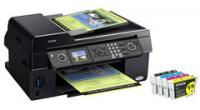
| STYLUS CX9300F | C11C696401 | |
| PRINTING METHOD | On-demand Inkjet (piezoelectric) | |
| NOZZLE CONFIGURATION | 4 x 90 nozzles (Black, Cyan, Yellow, Magenta) | |
| RESOLUTION | ||
| 5760 x 1440 optimised dpi with 3pl droplets (with Variable-Sized Droplet Technology) | 5760 Optimised dpi using Resolution Performance Management (RPM) Technology | |
| PRINT SPEED | ||
| BLACK TEXT (MEMO) A4 (DRAFT)^ | Approx. 32ppm*1 | |
| COLOUR TEXT (MEMO) A4 (DRAFT)^ | Approx. 32ppm*2 | |
| PHOTO 4" x 6" (10 x 15cm) (DRAFT)^ | Approx. 26 sec *3 | |
Print Speed Data Printout Patterns The thumbnail images below show the printout patterns used to determine print speed specifications. *"Second" rating refers to the time taken to print one page. The computer environment we test under is as follows: CPU: Pentium 4, 2.4GHz; RAM: 512MB; OS: Windows XP professional; Interface/Connectivity: USB2.0 HighSpeed; SOFTWARE: Word XP/PhotoShop7.0; PAPER: Epson Premium Glossy Photo Paper or Plain Paper + When printed on Epson Premium Glossy Photo Paper | ||
| PAPER HANDLING | ||
| PAPER FEED METHOD | Friction feed with paper feeder and automatic document feeder | |
| PAPER SIZES | A4, A5, B5, Half Letter, A6, Legal, 13 x 18cm, 10 x 15cm, 9 x 13cm, 13 x 20cm, 20 x 25cm Envelopes: C6, No 10, DL | |
| PAPER HOLD CAPACITY | Input capacity: 120 sheets, A4 Plain paper (60g/m2) | |
| *True BorderFree printing is available for the following media sizes: 4" x 6", 5" x 7" and A4. Media types recommended : Premium Glossy Photo paper A4, 4" x 6" and 5" x 7", Matte Paper - Heavyweight. BorderFree prints are media dependent. | ||
Scanner | ||
| SCANNER TYPE | A4 Flatbed colour image scanner | |
| DOCUMENT SIZE | Up to A4 | |
| PIXEL DEPTH | Input 48bits (16bits/colour) / output 24bits (8bits/colour) | |
| SCANNING RESOLUTION | 1200 x 2400 dpi | |
| MONO SCAN SPEED | A4 300dpi 2.2mSec/line A4 600dpi 7.0msec/line A4 1200dpi mono 8.8msec/line | |
| COLOUR SCAN SPEED | A4 300dpi 7.5msec/line A4 600dpi 13.1msec/line A4 1200dpi colour 25.4msec/line | |
Copy Function | ||
| COPY SPEED | ||
| COPY SPEED BLACK TEXT MEMO (A4)+ | Approx. 30cpm (Draft) | |
| COPY SPEED COLOUR TEXT MEMO (A4)+ REDUCTION/ENLARGEMENT COPY MODES |
Approx. 30cpm (Draft) Auto Fit Function Standard copy mode/ BorderFree | |
Fax Function | ||
| TRANSMISSION & RECEPTION | ||
| TYPE | Colour and mono support | |
| LINES | PSTN (general phone lines) | |
| TRANSMISSION SPEED | Up to 33.6kbs (approx. 3 secs per page) | |
| SPEED DIAL | Up to 60 Names & Numbers | |
| MEMORY | Up to 180 pages (ITU-T No.1 chart) | |
| AUTOMATIC DOCUMENT FEEDER FUNCTION | ||
| MAXIMUM DOCUMENT SIZE | A4 | |
| PAPER TYPES SUPPORTED | Plain paper 60~95g/m2 | |
| PAPER CAPACITY | Up to 30 pages (Plain paper only) | |
General | ||
| OPERATING SYSTEMS | ||
| PRINTER DRIVERS* | Win® 98SE/Me/2000/XP/XP x64/Vista, Mac® OS 10.2.8 to 10.5* with USB | |
| * Drivers if available are downloadable from Tech Epson | ||
| ELECTRICAL SPECIFICATIONS | ||
| RATED VOLTAGE | AC 220 ~ 240V | |
| RATED FREQUENCY | 50 ~ 60Hz | |
| POWER CONSUMPTION | Approx. 13W Standalone copying (ISO10561 Letter Pattern) Approx 3.2W (Sleep Mode) | |
| NOISE LEVEL | ||
| NOISE LEVEL | 5.3B, 39db(A)>> | |
| INTERFACES | ||
| CONNECTIVITY | HiSpeed USB Compatible with the USB 2.0 Specification. (cable included) | |
| LCD SCREEN | 2.5" with tilt adjustment | |
| CARD SLOTS | CF Type II, Memory Stick, SD/MMC, XD-Picture card | |
| PRINTER SOFTWARE (AVAILABLE ON CD-ROM ONLY) | ||
| SOFTWARE TOOLS* | Epson File Manager Epson Scan Assist Epson Attach to Email Epson Copy Utility Epson Easy Photo Print Epson Web-To-Page Online Guide | |
| WARRANTY | ||
| |
12 months return to base | Standard |
| |
Optional Additional 2 Year Warranty | 3YWCX9300F |
| |
Epson Warranty | |
| PRODUCT DIMENSIONS | 460mm (W) x410mm (D) x 236mm (H) (Closed) 460mm (W) x 479mm (D) x 269 mm (H) (Open) | |
| WEIGHT | 7.6kg | |
| LIGHTFASTNESS | ||
| LIGHTFASTNESS# | 120 years on Epson Matte Paper - Heavyweight | |
| LIGHTFASTNESS TEST CRITERIA (INDOOR DISPLAY CONDITIONS) | ||
| LIGHT SOURCE | Fluorescent light | |
| INTENSITY | 70k lux | |
| TEMPERATURE | 24°C | |
| HUMIDITY | 60% RH | |
| GLASS MOUNT | 2mm, soda lime | |
| FADE CRITERIA | Pure YMC 30% loss at OD=1 | |
| DISPLAY LIFE CALCULATION | Total illuminance/(500 lux x 10 hours x 365 days = 1 year) | |
| Tests developed and conducted by Epson under fluorescent light (indoor display condition) with glass mount. The data is calculated by Epson's accelerated test of prints on specialty media. | ||
| # Data is calculated using accelerated simulation of fading under indoor preservation conditions including fluorescent light indoor display. Temperature, humidity and some atmospheric gases may also affect the rate of fading. The estimated lightfastness period does not indicate the colour changing or the durability of the paper itself. Epson recommends that your prints be stored in a photo album (or plastic photo storage box) in acid free, archival sleeves commonly available from most camera shops. | ||
| INK CARTRIDGES & YIELDS | ||
| STANDARD INK CARTRIDGES | Black T0731, Cyan T0732, Magenta T0733, Yellow T0734 | |
| HIGH CAPACITY BLACK INK CARTRIDGE ONLY | T073H | |
| COLOUR COMPOSITE INK YIELD^^ | Approx. 335 pages | |
| STANDARD BLACK INK YIELD^^ | Approx. 245 pages | |
| HIGH CAPACITY BLACK INK YIELD^^ | Approx. 385 pages | |
|
+ Copy speed when printed on plain paper in the fastest mode. Copy speed may vary depending on copy mode, document complexity, type of paper used and number of copies. >> According to ISO7779 Pattern with Premium Glossy Photo Paper / Photo RPM mode. | ||
PAPER & INK
The printer ships with full ink cartridges and part of the ink from the first cartridges is used for priming the printer. Yields vary considerably based on images printed, print settings, paper type, frequency of use and temperature.
When an ink cartridge needs replacing, you cannot continue copying or printing even if the other cartridges do not need replacing.
Leave the cartridge that needs replacing installed in the printer until you have obtained a replacement. Otherwise the ink remaining in the print head nozzles may dry out.
To ensure ongoing print quality and trouble free operation, a variable amount of ink remains in cartridge after the Replace Cartridge indicator comes on.
Warning to Epson printer owners. Many well known third party companies claim their inkjet printing papers are compatible with all Epson inkjet printers. Epson has reports from many customers who have used third party's paper and have been very disappointed with the results. When the same customers have changed to genuine Epson paper, they have been amazed and pleased with the colour and quality of their prints. Epson recommends that you do not use any non genuine printing papers if you want to get the best results from your Epson printer. Epson printers are very carefully tuned to ensure Epson inks and Epson's patented MicroPiezo printhead produce the best quality prints using carefully selected Epson paper.
All other brands of printing papers are not wholly compatible with the printer.
Link to for more information and independent studies on media durability by Wilhelm Research
Equipment supplied by Epson Australia is designed to function in conjunction with genuine Epson consumables and accessories specifically configured for it.
The Epson Intellidge Ink System is designed to work perfectly in harmony with the printer and
your choice of media to ensure you get:

Located in the Philippines!
advertisements